
How to Navigate Conversations in Ignite Funnels
Conversations is your team's shared inbox in Ignite Funnels. WhatsApp, email, calls, SMS, Facebook, Instagram and Google Business Profile messages all land in one place, so you can find, review, assign and manage every customer message without switching apps.
Watch the video
Before you begin
Check you are in the correct Ignite Funnels account and that your role includes access to Conversations. See Understanding User Roles and Permissions.
Open the inbox
- Click Conversations in the main menu.
- Confirm you are viewing the correct account or location.
Find a conversation
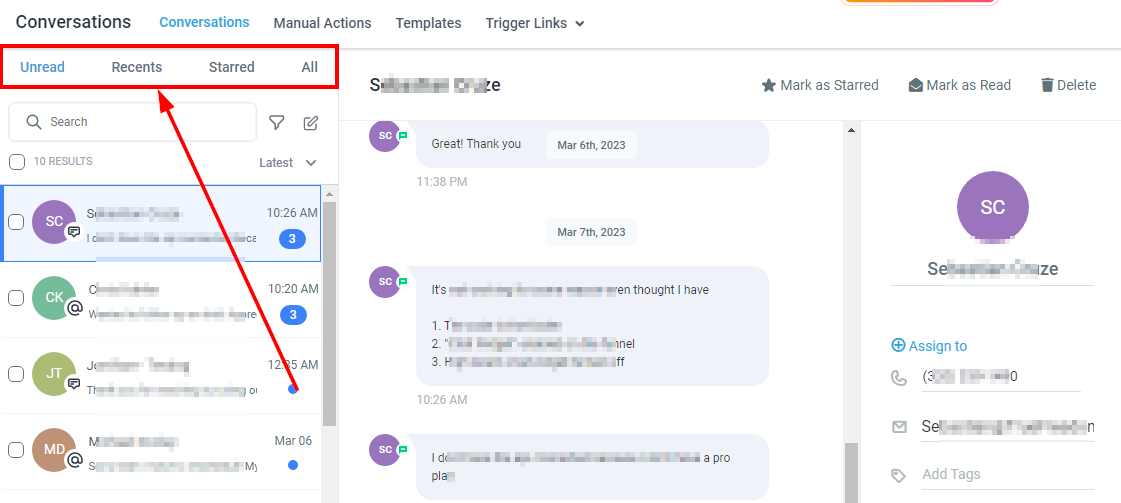
Use the search bar to look up a customer by name, email address or phone number. You can also switch between inbox views such as Mine, Unread, Starred and All, depending on your permissions.
If you cannot find a conversation, clear any active filters and search again using a different customer detail.
Open and review the conversation
Click the conversation and read the full history before you act. Check:
- The latest customer message
- Earlier replies and internal notes
- Who it is assigned to
- Which channel it came through
- Any follow-up that was promised
Do not reply based on the preview alone. Every message is labelled with its channel and a timestamp, so anyone on your team can pick up where the last person left off.
Use filters
Filters help narrow a busy inbox, for example by channel, assignment, unread status or date. Clear them when you are done so you do not miss other messages. See How to Search and Filter Conversations.
Manage the conversation
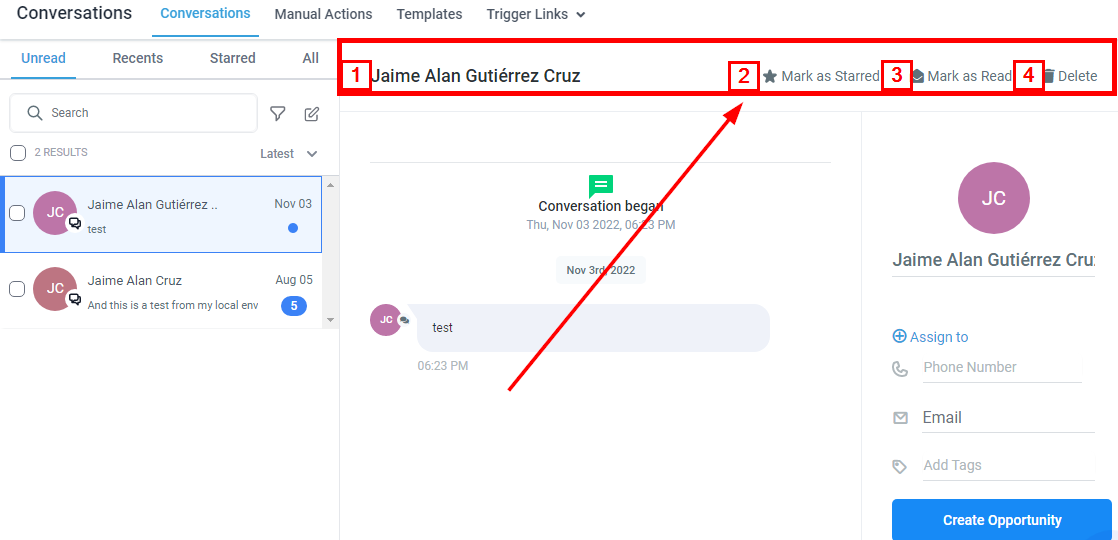
Depending on your permissions, you can:
- Assign it to a team member (see How to Assign or Reassign a Conversation)
- Mark it as read or unread
- Star it for follow-up
- Add an internal note
- Close or archive it when the matter is finished
Before closing or archiving, make sure the customer has had a reply and nothing is left to follow up. Do not delete a conversation unless you are specifically authorised, because deletion cannot be undone.
Add an internal note
Choose Internal Note before typing team-only information, and check the box is still in Internal Note mode before you submit.
Important: a customer reply and an internal note are different. Never type sensitive team information until you have confirmed Internal Note mode is on.
Tip for Kenyan businesses
Many customers message on WhatsApp first and then call. Keeping both in one thread means your team sees the whole story, including any M-Pesa payment links already sent.
Common issues
- Conversation is missing: clear filters and search using another customer detail.
- Only some conversations are visible: check the inbox view, assignment and your permissions.
- Cannot reply: check your role and the selected channel.
- Duplicate replies: read the whole thread and coordinate with the assigned team member.
- Message sent to the wrong customer or channel: tell an administrator straight away.
Frequently asked questions
Why can I only see conversations assigned to me?
You may be on the Mine view, or your role may limit you to assigned conversations.
Why can I not reply?
Your role may not allow sending, or the channel may not be connected.
Should I delete a finished conversation?
No. Close or archive it instead unless deletion is specifically authorised.
Why is a customer message not showing?
Check the channel is connected, then check the inbox view, filters, search terms, assignment and date range, and that your role allows access. If it is still missing, contact Support with the customer, channel and approximate time, without sharing sensitive content.
Related guides
- Understanding User Roles and Permissions
- How to Respond to Customer Messages
- How to Report a Bug or Technical Issue
Need help?
Click the help button in the bottom right corner of your Ignite Funnels account to search more guides or chat with our support team.



